• Home
  • About
  • Archive
  • Other
  • Find Me

Ubuntu kernel install out-of-tree rust kernel module

2026年02月23日 | Fxzjshm | :

Here records steps for building rust-out-of-tree-module on Ubuntu 24.04 HWE kernel 6.17.0-14-generic

Useful Links

  • Ubuntu kernel is getting “Rusty” in Lunar https://discourse.ubuntu.com/t/ubuntu-kernel-is-getting-rusty-in-lunar/34977

Step

First Rust support in Ubuntu kernel is a separate package other than linux-header-... packages, so:

sudo apt install linux-lib-rust-`uname -r` 

Then for HWE kernels, e.g. linux-hwe-6.17, /usr/src/linux-headers-6.17.0-14-generic/rust points to ../linux-hwe-6.17-lib-rust-6.17.0-14-generic/rust but folder installed from package linux-lib-rust-6.17.0-14-generic is linux-lib-rust-6.17.0-14-generic/rust, thus make a soft link:

cd /usr/src sudo ln -s linux-lib-rust-6.17.0-14-generic linux-hwe-6.17-lib-rust-6.17.0-14-generic 

Then comes to compiler. If using a different compiler to that when compiling kernel, build script complains:

 RUSTC [M] rust_out_of_tree.o error[E0514]: found crate `core` compiled by an incompatible version of rustc | = note: the following crate...


• • • >>

实序列快速 Fourier 变换

2025年12月28日 | liam-ji | :

方法转载自: https://www.cnblogs.com/liam-ji/p/11742941.html

一、功能

用 N 点复序列快速傅立叶变换来计算 2N 点实序列的离散傅立叶变换。

二、方法简介

假设 $ x(n) $ 是长度为 $ 2N $ 的实序列,其离散傅立叶变换为

\[X(k)=\sum_{n=0}^{2N-1}x(n)W_{2N}^{nk} \ , \ k=0,1,...,2N-1\]

为有效地计算傅立叶变换 $ X(k) $, 我们将 $ x(n) $ 分为偶数组和奇数组,形成两个新序列 $ x(n) $ 和 $ g(n) $,即

\[\left\{\begin{matrix}\begin{align*}f(n)&=x(2n)\\ g(n)&=x(2n+1)\end{align*}\end{matrix}\right. , n=0,1,...,N-1\]

然后将 $ f(n) $ 和 $ g(n) $ 组成一个复序列 $ h(n) $

\[h(n)=f(n)+jg(n), \ n = 0,1,...,N-1\]

用 FFT 计算 $ h(n) $ 的 $ N $ 点傅立叶变换 $ H(k) $, 并且 $ H(k) $ 可表示为

\[H(k)=F(k)+jG(k), \ n = 0,1,...,N-1\]

由上容易推出

\[\left\{\begin{matrix}\begin{align*}F(k)&=\frac{1}{2}[H(k)+H^{*}(N-k)]\\ G(k)&=-\frac{j}{2}[H(k)-H^{*}(N-k)]\end{align*}\end{matrix}\right. , n=0,1,...,N-1\]

求得 $ F(k) $ 和 $ G(k) $ 后,利用下面的蝶形运算计算 $ x(n) $ 的离散傅立叶变换 $ X(k) $

\[\left\{\begin{matrix}\begin{align*}X(k)&=F(k)+G(k)W_{2N}^{k}\\ X(k+n)&=F(k)-G(k)W_{2N}^{k}\end{align*}\end{matrix}\right. , n=0,1,...,N-1\]

这种实序列 FFT 算法比相同长度的复序列 FFT 算法大约可减少一半的运算量。


\[W_{N}^{nk}=e^{-j\frac{2\pi nk}{N}}\]
将 SNAP 配置程序移植到龙芯派 | Port SNAP configure program to Loongson Pi

2025年07月18日 | Fxzjshm | :

对于树莓派, 参见 https://fxzjshm.github.io/blog/build-a-raspberry-pi-image-for-snap/.
For Raspberry Pi, see https://fxzjshm.github.io/blog/build-a-raspberry-pi-image-for-snap/.

本文对 katcp 的修改对应仓库为 https://github.com/fxzjshm/katcp_devel/tree/loongson-2k0300-devel.

0. 引言

SNAP (Smart Network ADC Processor) 是 CASPER 开发的低成本采样装置, 更多信息可见 https://github.com/casper-astro/casper-hardware/blob/master/FPGA_Hosts/SNAP/README.md. 通常情况下需要使用树莓派来驱动 SNAP, 但一些已有的镜像对应的树莓派版本已经不再销售, 可考虑其他单板计算机来控制 SNAP, 例如龙芯 2K0300 先锋派.

龙芯 2K0300 先锋派的信息参见 https://www.loongson.cn/news/show?id=688. 选择此板的主要原因为 GPIO 兼容, 省去了重新画电路板适配 GPIO 的过程.

1. 下载系统

龙芯先锋派的系统、内核等信息可从以下链接获取:

  • 根文件系统、内核二进制与源码下载: https://pan.baidu.com/s/1FZcnFcmTGd5GcyP8ayFm5A?pwd=1234
  • 文档: https://gitee.com/open-loongarch/docs-2k0300
  • 内核源码: https://gitee.com/open-loongarch/linux-6.12

为了方便安装依赖, 这里使用有包管理器的、新世界 (新 ABI) 的 Alpine 作为基本系统. 在 SD 卡中创建 ext4 分区, 将根文件系统解压并复制进去即可. 为了确保功能正常, 可以将内核手动替换为新版本.

注意 Alpine 3.21 开始支持龙架构, 但 Alpine 3.22 的预编译程序运行时出现 illegal instruction 的报错, 因此似乎只能使用 Alpine 3.21.

然后卸载 SD 卡, 装入龙芯先锋派并启动.

2. 安装 CASPER 相关软件

2.1 casperfpga

• • • >>

将 PostScript 图 "无损" 转换为 SVG | Convert PostScript to SVG "losslessly"

2025年07月4日 | Fxzjshm | :

Typst 目前并不支持 PostScript 甚至 PDF, 若文档需要插入 PGPLOT 绘制的 .ps 图, 需要转换. 以下探索了一种 看起来 无损 转换为 SVG 的方法.
Typst does not support PostScript and even PDF for now, if need insert .ps figure plotted by PGPLOT in document, it nees convert. Here discovered a method to convert PS to SVG that seems losslessly.

for f in *.ps; do eps2eps $f $f.eps; gs -dBATCH -dEPSFitPage -dAutoFilterColorImages=false -dColorImageFilter=/FlateEncode -dNOPAUSE -sDEVICE=pdfwrite -sOutputFile=$f.eps.pdf $f.eps qpdf $f.eps.pdf --rotate=180 -- $f.eps.rotated.pdf inkscape --export-type=svg --export-area-drawing $f.eps.rotated.pdf rm $f.eps $f.eps.pdf $f.eps.rotated.pdf done 

注意很多其它方法会导致内部位图被降采样.
Notice that many other methods may downsample internal rastered image.

注意对不同软件绘制的图, 需要旋转的度数不同 (例如 PulsarX 180 度, PRESTO 与 DSPSR/PSRCHIVE 90 度).
Notice...

• • • >>

Set up sudo mail warn

2025年02月14日 | Fxzjshm | :

目标 Target

当 sudo 检测到异常时, 自动产生记录并提醒管理员; 机器上没有邮件服务器.
When sudo detects abnormal incidents, auto generate record and notify admin; no mail server on machine.

思路 Idea

graph TD
  sudo --"postfix"--> mail
  mail --if local--> local(( ))
  local --> Thunderbird[Thunderbird old version]
  local --> dovecot
  
  mail --if remote--> remote(( ))
  remote --> rsync[rsync file to local] --> local

步骤 Steps

1. postfix

需要有一个程序来接收 sudo 产生的邮件, 这里选择 postfix.
There should be some program to receive mail generated by sudo, here we choose postfix.

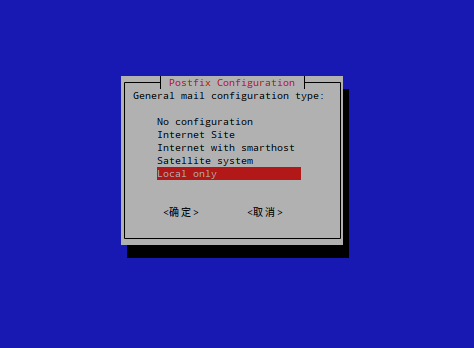
安装 postfix; 由于没有邮件服务器, 在此方案中配置为本地模式; 其它配置保持默认.
Install postfix; as there is no mail server, here configure it as local mode; other settings remain default.

postfix-configure.png

2. sudo

编辑 /etc/sudoers.d/mail-sysadmin 并输入下面的内容, 注意将 admin 替换为你需要的用户.
Edit /etc/sudoers.d/mail-sysadmin and input the following lines, note: replace admin with user you want.

• • • >>

llama.cpp linked to serial OpenBLAS on RHEL

2025年02月2日 | Fxzjshm | :

Problem

When running llama.cpp on RHEL9-like OS, it is noticed that a large portion of time is single-threaded, which is unexpected.

Attaching with GDB shows that it is running sgemm provided by OpenBLAS; but OpenBLAS should run with multiple threads.

Analyze

Search engine gives this post: Red Hat Bugzilla – Bug 1589823 - The OpenBLAS package that comes with RHEL does not have multithreading capabilities

Don’t use the sequential library if you want the parallel one. Use -lopenblaso for OpenMP and -lopenblasp for pthreads.

This behavior is different from Debian-like OSs. e.g. in Ubuntu 24.04, the OpenBLAS variant used is mananged by update-alternatives, and only libopenblas.so is provided.

Moreover, CMake checks libopenblas.so only: FindBLAS.cmake @ 321b71c, line 751-805

Solution

Not sure whether package policy or FindBLAS should change. An issue is reported: cmake/cmake#26659.

Workaround...

• • • >>

Enable FSBL_DEBUG in recent versions of Petalinux

2025年01月18日 | Fxzjshm | :

Problem

For debugging RFSoC booting from SD card, the FSBL_DEBUG is helpful (See official doc, search for “debug”).

Some of Q&As e.g. “How to enable FSBL customization in petalinux”, and even official doc “Zynq UltraScale+ MPSoC Software Developer Guide (UG1137)”, give a method:

mkdir -p <plnx-proj-root>/project-spec/meta-user/recipes-bsp/fsbl vim <plnx-proj-root>/project-spec/meta-user/recipes-bsp/fsbl/fsbl_%.bbappend 

File content:

#Enable appropriate FSBL debug flags YAML_COMPILER_FLAGS_append = " -DFSBL_DEBUG" 

However this doesn’t work in recent versions of Petalinux, e.g. 2024.1.

Analyze

It is easily noticed that other .bbappend files uses a different syntax, e.g. recipes-bsp/u-boot/u-boot-xlnx_%.bbappend has a line like:

SRC_URI:append = " file://platform-top.h file://bsp.cfg" 

So the fsbl_%.bbappend should be

# Enable appropriate FSBL debug flags YAML_COMPILER_FLAGS_append = " -DFSBL_DEBUG " 

But this still not working, • • • >>

Test AdaptiveCpp on Rusticl

2025年01月6日 | Fxzjshm | :

Intro

Recently Rusticl has implemented shared virtual memory (SVM), see Karol Herbst’s post & related Phoronix news.

This enables SYCL on Rusticl on e.g. RadeonSI, which may be compared to SYCL on ROCm; before that, let’s take a first-time look.

Although for now Rusticl on RadeonSI has only coarse-grained SVM but AdaptiveCpp requires fine-grained SVM (author thought it isn’t too strict, see AdaptiveCpp#1113), it is possible to emulate USM upon coarse-grained SVM using intel/opencl-intercept-layer.

Build

Firstly, download source code.

git clone https://gitlab.freedesktop.org/karolherbst/mesa.git -b rusticl/svm/coarse cd mesa 

Build MESA with Rusticl enabled:

meson setup build -Dprefix="/media/build-cache/mesa-install" -Dgallium-rusticl=true -Dllvm=enabled -Dgallium-opencl=icd -Drust_std=2021 -Dgallium-drivers="radeonsi,virgl,svga,swrast,iris,crocus,i915,zink" ninja ninja install 

Note, for now MESA requires LLVM 19, and meson may select corrent Clang...

• • • >>

Build Rust-For-Linux kernel

2025年01月6日 | Fxzjshm | :

Ref: https://leosaa.medium.com/build-the-latest-kernel-package-for-debian-85b09ec6af88

cp -v /boot/config-$(uname -r) .config
make menuconfig
make olddefconfig

Disable signing keys and debug:

scripts/config --disable SYSTEM_TRUSTED_KEYS
scripts/config --disable SYSTEM_REVOCATION_KEYS
scripts/config --disable DEBUG_INFO
scripts/config --enable DEBUG_INFO_NONE

Note, currently rust support requires MODVERSION to be disabled, double check if Rust supports is shown in menuconfig.

Check setup of rust by:

make -j`nproc` LOCALVERSION=-rust LLVM=-19 rustavailable

where -19 is version of Clang used.

Then build:

make -j`nproc` LOCALVERSION=-rust LLVM=-19 bindeb-pkg

在 CASA 里添加台站 | Add observatory in CASA

2024年10月4日 | Fxzjshm | :

当导入数据到 CASA (Common Astronomy Software Applications) 时, 若台站不在 CASA 数据库中, 会得到如下报错:

RuntimeError: Exception: Telescope 21CMA is not recognized by CASA.
... thrown by casacore::MPosition casacore::MSMetaData::getObservatoryPosition(casacore::uInt) const at File: /source/casa6/casatools/casacore/ms/MSOper/MSMetaData.cc, line: 3305

从报错位置 MSMetaData.cc#L3305 可以追踪到 MeasTable.cc#L2905, MeasTable.cc#L2863, 得到关键词 “Observatories”, “measures.observatory.directory”, “geodetic”.

经过一些搜索后注意到该文件是 casacore 下载得到的, 通常位于 ~/.casa/data/geodetic/Observatories, 并且是类似 measurement set 的结构, 那么可用 Table 相关函数编辑.

注意 CASA 启动会加载该文件, 也就是加上读锁, 然后就无法获得写锁 (会死锁, 表现为程序卡死), 可以复制一份为 Observatories-bak 作为备份, 再复制一份为 Observatories-edit 编辑.

在 CASA 中使用

browsetable(tablename="/home/user/.casa/data/geodetic/Observatories-edit")

编辑加入台站参数即可. 记得退出 CASA 之后把 Observatories-edit 改回 Observatories.

第 1 页,共 4 页 1 2 3 4 »
Copyright © 2026 All Rights Reserved.

Contents in fxzjshm.github.io by fxzjshm are licensed under Creative Commons Attribution-NonCommercial 4.0 International Public License.

Hosted by GitHub. Theme created by 枫之楚